
Introduction
Internet Exchange Points (IXPs) are places where networks meet and exchange traffic. They improve performance, reduce dependence on transit providers, and create opportunities for direct interconnection. However, deciding where to peer, understanding which routes are actually exchanged, and troubleshooting routing incidents at an IXP all depend on one essential ingredient: routing visibility.
Today, that visibility is often incomplete. A BGP session with a route server exposes only the routes the server exports, while periodically polling route-server software provides snapshots rather than a continuous history. Neither approach gives a complete and standardized view of both route-server and bilateral sessions.
In this blog post, we introduce the bgproutes.io IXP Explorer, a set of dashboards and API capabilities built around data collected with the BGP Monitoring Protocol (BMP). We first explain how an IXP works and why routing visibility matters, then compare existing monitoring approaches with BMP, and finally show how the IXP Explorer, Prefix Explorer, AS Explorer, and public API can be used in practice.
How an IXP works
An IXP operates a Layer 2 network called the exchange fabric. Participating networks connect their routers to this fabric, which gives them a shared infrastructure over which they can establish BGP sessions and exchange traffic.
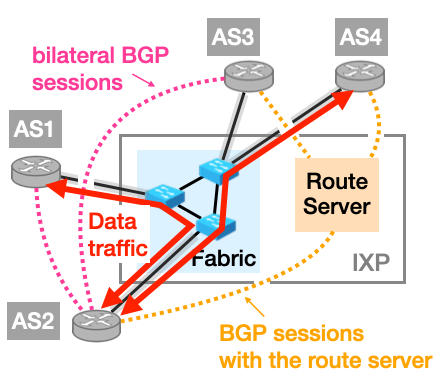
Participants can establish bilateral BGP sessions directly with one another. For example, AS1 and AS2 may decide to peer directly and exchange only the routes permitted by their respective policies. Bilateral sessions give both networks fine-grained control, but establishing and maintaining one session with every other participant does not scale well at a large IXP.
To simplify this, an IXP may operate one or more BGP route servers. A participant establishes a single BGP session with a route server and can then exchange routes with many other route-server clients. Conceptually, the route server helps emulate a full mesh of bilateral sessions on the control plane.
Importantly, the route server is not in the data path. It distributes BGP routes, but the packets themselves flow directly between participants across the exchange fabric.
Why routing visibility at IXPs matters
Routing visibility helps both IXP operators and the networks connected to them.
For an IXP operator, visibility can support the detection and investigation of routing incidents such as BGP hijacks and route leaks. It can also reveal bogus announcements involving reserved address space or private ASNs, as well as participants producing excessive or unstable routing updates.
For an IXP participant, visibility supports practical operational decisions: choosing an IXP, identifying useful bilateral peers, and troubleshooting unexpected routing changes.
Let’s examine two concrete use cases: choosing the right IXP to connect to and troubleshooting a transient routing path.
Choosing the right IXP
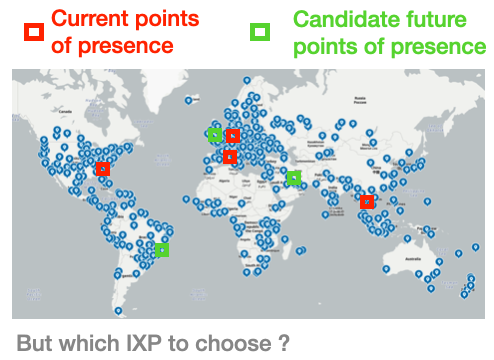
Imagine a network that already operates several points of presence and is considering where to expand next. PeeringDB and IXP websites can show which networks are present at each candidate exchange, but presence alone does not answer every operational question.
Which prefixes are actually visible at the IXP? Which participants announce them? Are the routes learned through route servers or bilateral sessions? How long are the observed AS paths?
Routing data helps turn a map of possible locations into an evidence-based peering decision. A network can compare candidate IXPs using the routes that are actually observed, identify where paths to important destinations are shortest, and discover participants with which a bilateral session may be valuable.
Troubleshooting a transient path
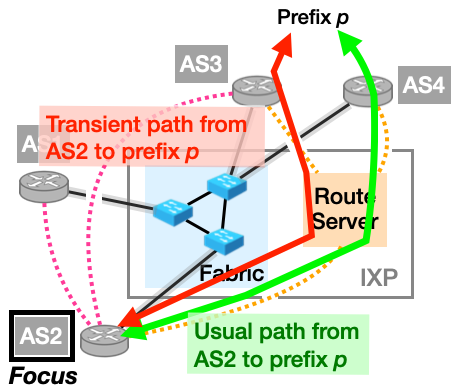
Consider the example in Figure 3 from the perspective of AS2. AS2 normally reaches prefix p through AS4, using a route learned from the route server. For a short period, however, AS2 switches to a path through AS3.
The forwarding change is visible, but its cause may not be. Did AS4 change its export policy? Did the BGP session between AS4 and the route server go down? Did AS3 announce a shorter path? Which updates arrived immediately before the change?
Answering these questions requires more than a current best-path snapshot. The operator needs the state of the relevant peer sessions, visibility before and after routing policies, alternate paths, and the sequence of updates that produced the transient state. That is precisely where the collection method matters.
Existing approaches to monitoring routing at IXPs
Two approaches are commonly used to collect routing information at an IXP.
BGP sessions with ADD-PATH
A monitoring platform can establish an ADD-PATH-enabled BGP session with the route server and, where possible, with individual participants. Unlike a conventional BGP session, BGP ADD-PATH allows multiple paths for the same prefix to be advertised.
This provides real-time updates through a standardized protocol and can cover bilateral sessions when participants also establish collection sessions. However, it still exposes only routes that the monitored router is willing to export. Routes rejected by an inbound policy, or suppressed by an outbound policy, remain invisible. The collection session also does not provide the complete operational state of the participant sessions represented by those routes.
Periodically polling route-server software
Another approach is to retrieve routes and peer information directly from the route-server software, as many looking-glass interfaces do. One widely deployed example is Alice Looking Glass, an open-source BGP looking glass that obtains routing data from external APIs exposed by route-server software. This can expose internal routing state, including routes that are not exported to a monitoring BGP peer, and can provide the state of the route server's participant sessions.
The trade-off is that polling produces periodic snapshots rather than a continuous stream of updates. A short-lived route may appear and disappear between two polls, leaving little historical context about when a change occurred or which sequence of updates caused it. The method is also specific to the route-server implementation and does not reveal activity on bilateral sessions between participants.
Strengths and weaknesses
The following table summarizes the comparison. The BMP column assumes that the router and collector support the relevant BMP extensions.
| Capability | BGP with ADD-PATH | Periodic polling of router software | BMP (all relevant RFCs supported) |
|---|---|---|---|
| Real-time visibility | ✅ | 🟠 Partial | ✅ |
| Continuous stream of updates | ✅ | ❌ | ✅ |
| Visibility into bilateral sessions | 🟠 Partial | ❌ | ✅ |
| Filtered and non-exported routes | ❌ | ✅ | ✅ |
| Participant session state | ❌ | ✅ | ✅ |
| Standardized | ✅ | ❌ | ✅ |
Why is BGP ADD-PATH only partial for bilateral-session visibility? ADD-PATH can export routes learned over bilateral sessions, including primary and backup paths. However, when those routes are collected through a separate BGP session, their original peer-session provenance is not reliably preserved. The collector may see the path, but it cannot precisely identify the bilateral session from which that route was learned.
BMP monitoring at IXPs with bgproutes.io
The BGP Monitoring Protocol (BMP) allows a router to export routes from several stages of its BGP processing pipeline. Depending on the router implementation and configuration, a BMP collector can receive:
- Pre-Policy Adj-RIB-In, containing routes exactly as they were received from each peer, before inbound policy is applied.
- Post-Policy Adj-RIB-In, containing the routes that remain after inbound policy.
- Loc-RIB, containing the routes selected by the BGP decision process.
- Pre-Policy and Post-Policy Adj-RIB-Out, showing routes before and after outbound policy.
- Peer-state information and route-monitoring messages, providing a continuous record of session changes and routing updates.
For a more detailed explanation of these stages and how bgproutes.io collects them, see our blog post on expanding Internet routing visibility with BMP.
At an IXP, bgproutes.io can establish a BMP session with the route server, with one or more participant routers, or with both. These two collection points provide complementary views of the routing information exchanged at the IXP.
Route-server BMP session
At an IXP, a single BMP session from a route server can expose per-participant routing information for all of the BGP sessions monitored by that server.
Participant BMP session
To complement route-server data—or partially compensate when a route server does not provide BMP data—a BMP session from a participant router can also provide highly valuable visibility. Its Adj-RIB-In can include routes received from the route servers as well as routes received over bilateral sessions with other participants.
bgproutes.io collects, stores, and makes this BMP data available through public dashboards, an API, and raw-data services.
The resulting view is intentionally evidence-based: it shows what contributing routers actually observe. It is not necessarily a complete view of every route at an IXP, because coverage depends on the route servers and participants that export BMP data. Every new contribution expands that visibility.
Exploring an IXP
The IXP Explorer brings together all BMP-derived observations associated with a selected IXP. Users can search by IXP name, identifier, city, or country, then move between route-server data, participant data, and the prefixes visible at the exchange.
Routes received from route servers
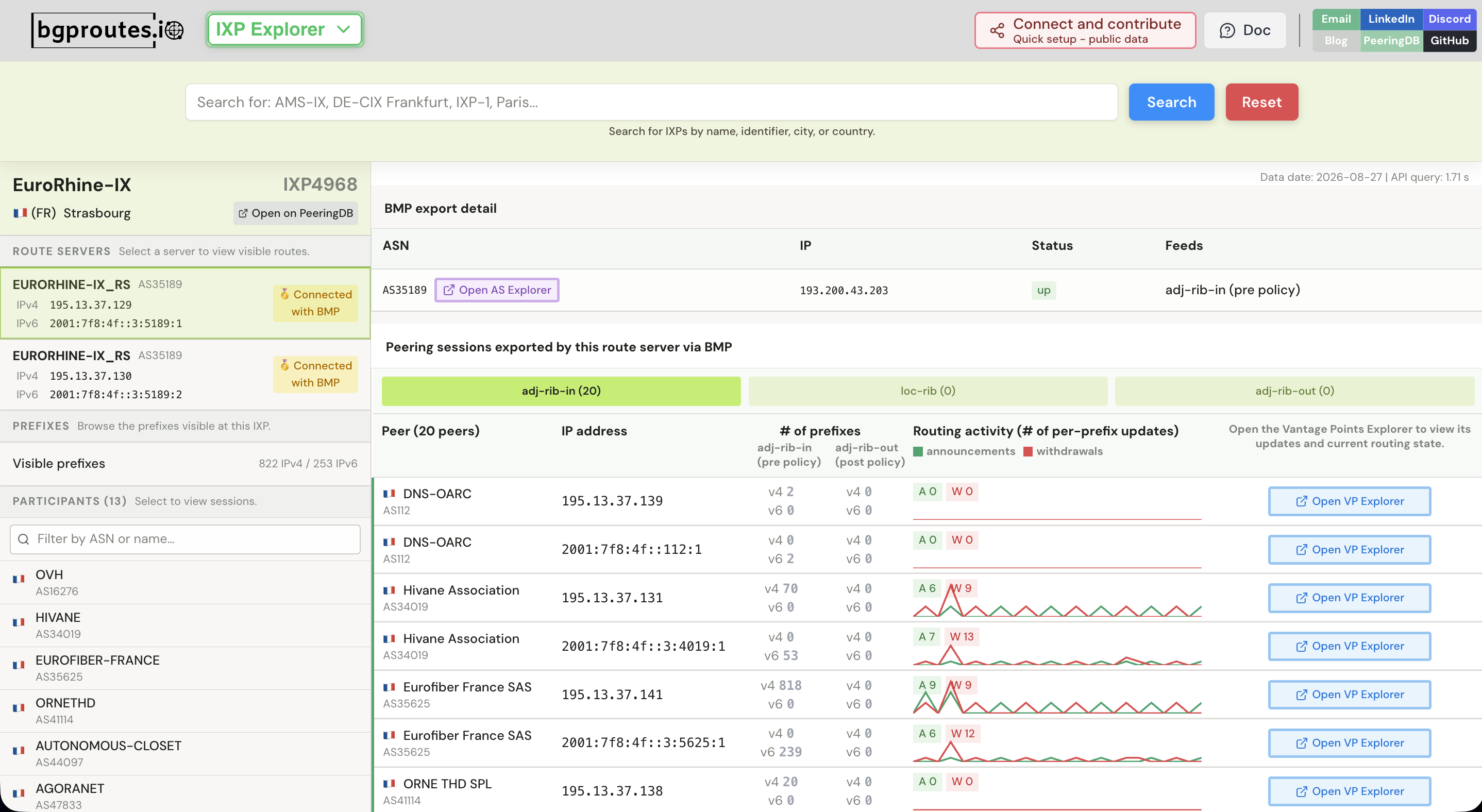
When the IXP Explorer loads a selected IXP, the top of the left sidebar identifies the exchange by its name, location, and PeeringDB IXP ID. Immediately below, the dashboard lists the route servers operated by that IXP, together with their IPv4 and IPv6 addresses.
Each route server also has a connection-status badge:
- 🥇 Connected with BMP means that the route server currently exports BMP data to bgproutes.io.
- 😭 Not connected to BMP means that no BMP feed is currently available from that route server.
Selecting a route server connected with BMP opens its information on the right side of the dashboard. The first panel shows the BMP export details, including the route server's ASN and IP address, the session status, and the BMP feed types being exported. Below it, the dashboard lists the BGP sessions between the route server and its participants for which data is available through that BMP session.
This list can contain hundreds of sessions. At many IXPs, a large proportion of participants connect to the route servers, so the number of monitored BGP sessions can be close to the size of the route server's participant base. For every session, the IXP Explorer identifies the participant by its name and ASN and shows the IP address used to connect to the route server.
The session panel can be explored by BMP stage:
- Adj-RIB-In shows the routes sent by each participant to the route server. It can contain a pre-policy view, before the route server applies its inbound policy, and a post-policy view, after that policy has been applied.
- Loc-RIB shows the per-peer best routes selected by the route server.
- Adj-RIB-Out shows the routes sent in the opposite direction, from the route server to each participant. It also supports pre-policy and post-policy views around the route server's outbound policy.
For a selected session and BMP stage, the dashboard shows the number of visible IPv4 and IPv6 prefixes and summarizes routing activity over time, including the number of announcements and withdrawals. Clicking Open VP Explorer opens the corresponding Vantage Point Explorer, where the operator can inspect the underlying data in detail: the stream of BGP updates and the routing state—the RIB—at a selected time within the most recent days of retained data.
Routes received from participants
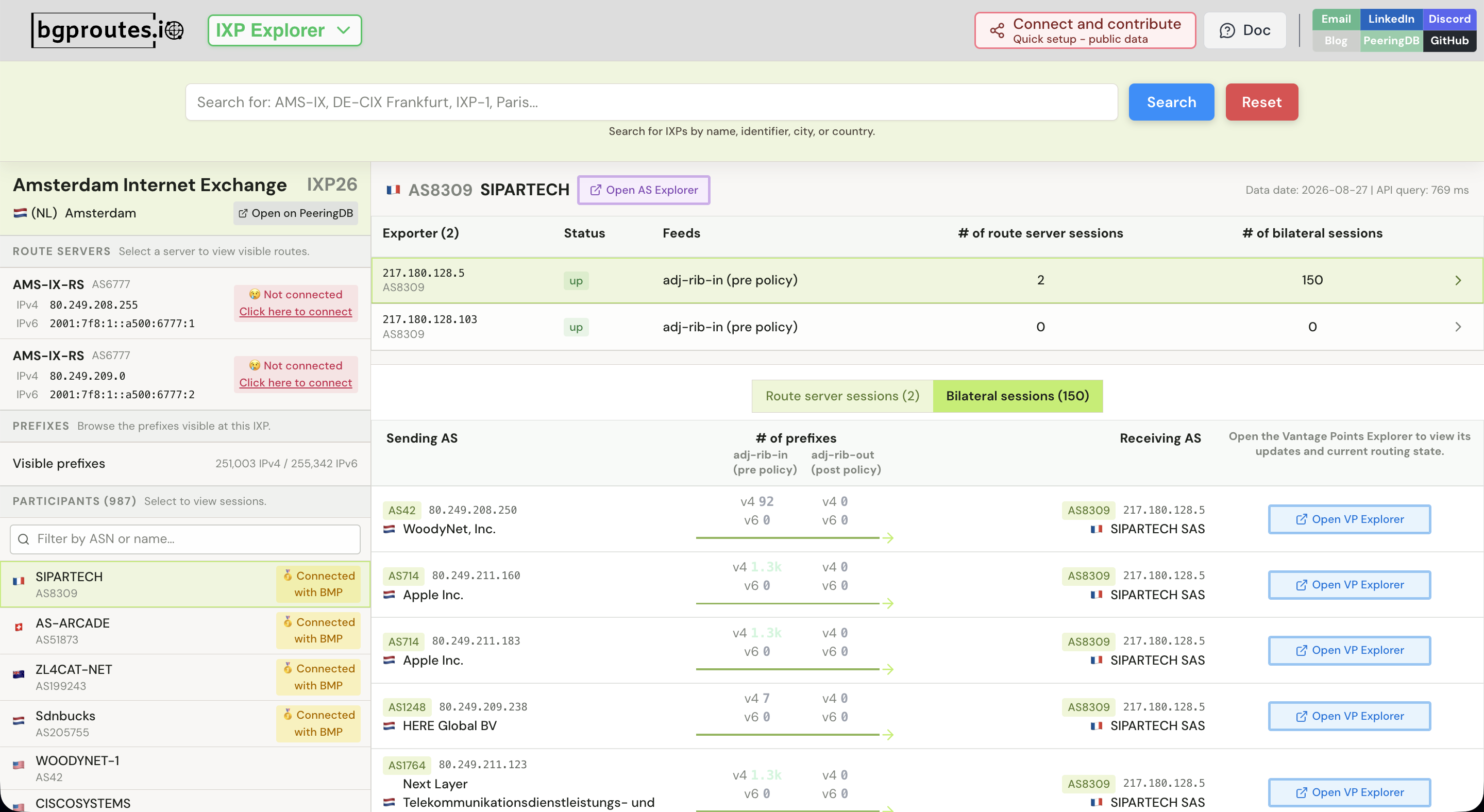
The lower part of the left sidebar lists the IXP's participants. A participant with at least one BMP session to bgproutes.io is marked with the yellow 🥇 Connected with BMP badge.
In Figure 5, four participants visible in the sidebar—SIPARTECH, AS-ARCADE, ZL4CAT-NET, and Sdnbucks—are connected to bgproutes.io with BMP. Selecting one of them opens its BMP information on the right. Here, SIPARTECH is selected, so the upper panel shows the BMP sessions established by SIPARTECH's routers with bgproutes.io. The panel below lists the BGP sessions exported through the selected BMP session.
These BGP sessions are divided into two categories:
- Route-server sessions, representing the participant's BGP sessions with the IXP route servers.
- Bilateral sessions, representing direct BGP sessions with other participants across the exchange fabric.
For the selected SIPARTECH exporter, the dashboard shows 2 route-server sessions and 150 bilateral sessions. Figure 5 displays the bilateral-session tab. Each row places the sending AS on the left and the receiving AS on the right, with the arrow in the middle indicating the direction in which the route was learned.
In this example, SIPARTECH exports Adj-RIB-In data. The dashboard therefore shows the routes that SIPARTECH receives from neighboring participants over its bilateral BGP sessions. This perspective is particularly valuable because those bilateral routes are normally invisible from the IXP route server.
As in the route-server view, clicking Open VP Explorer opens the corresponding Vantage Point Explorer. From there, the user can inspect the underlying routing data, including the raw stream of updates and the routing state at a selected time.
Prefixes visible at the IXP
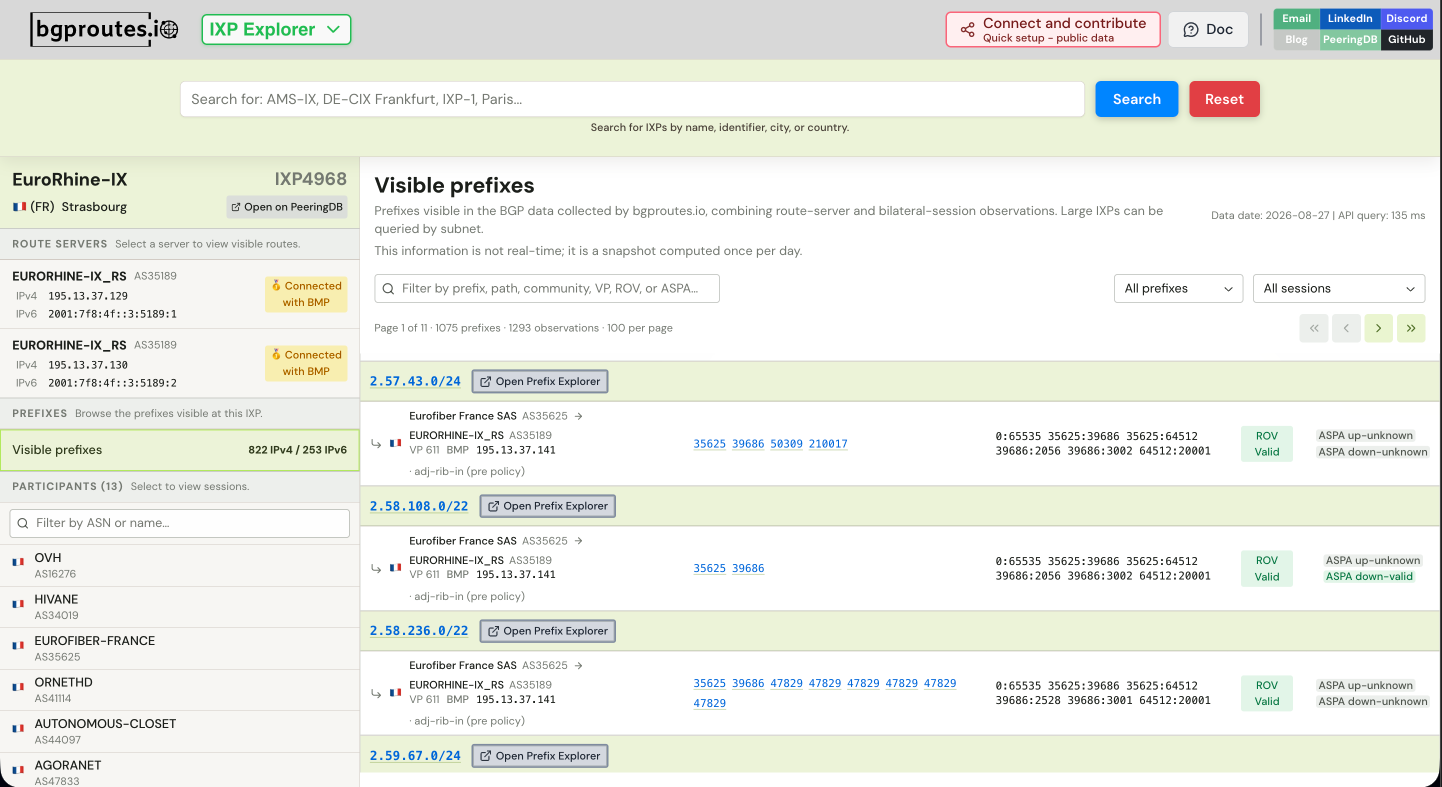
The Visible prefixes view aggregates the prefixes observed at the selected IXP through BMP sessions established by its route servers and participants. For each prefix, it lists the sessions from which the route was received and displays useful routing attributes such as the AS path, communities, and RPKI validation results.
Because the same prefix may be visible from several sessions, this view makes it possible to compare observations without losing their provenance. Users can filter by prefix, path, community, vantage point, ROV status, or ASPA status, and can open the Prefix Explorer to compare the route with observations from other IXPs.
Comparing a prefix across IXPs
The Prefix Explorer answers the inverse question. Instead of starting with an IXP and browsing its prefixes, a user starts with a prefix and asks: at which IXPs is this prefix visible, and through which routes?
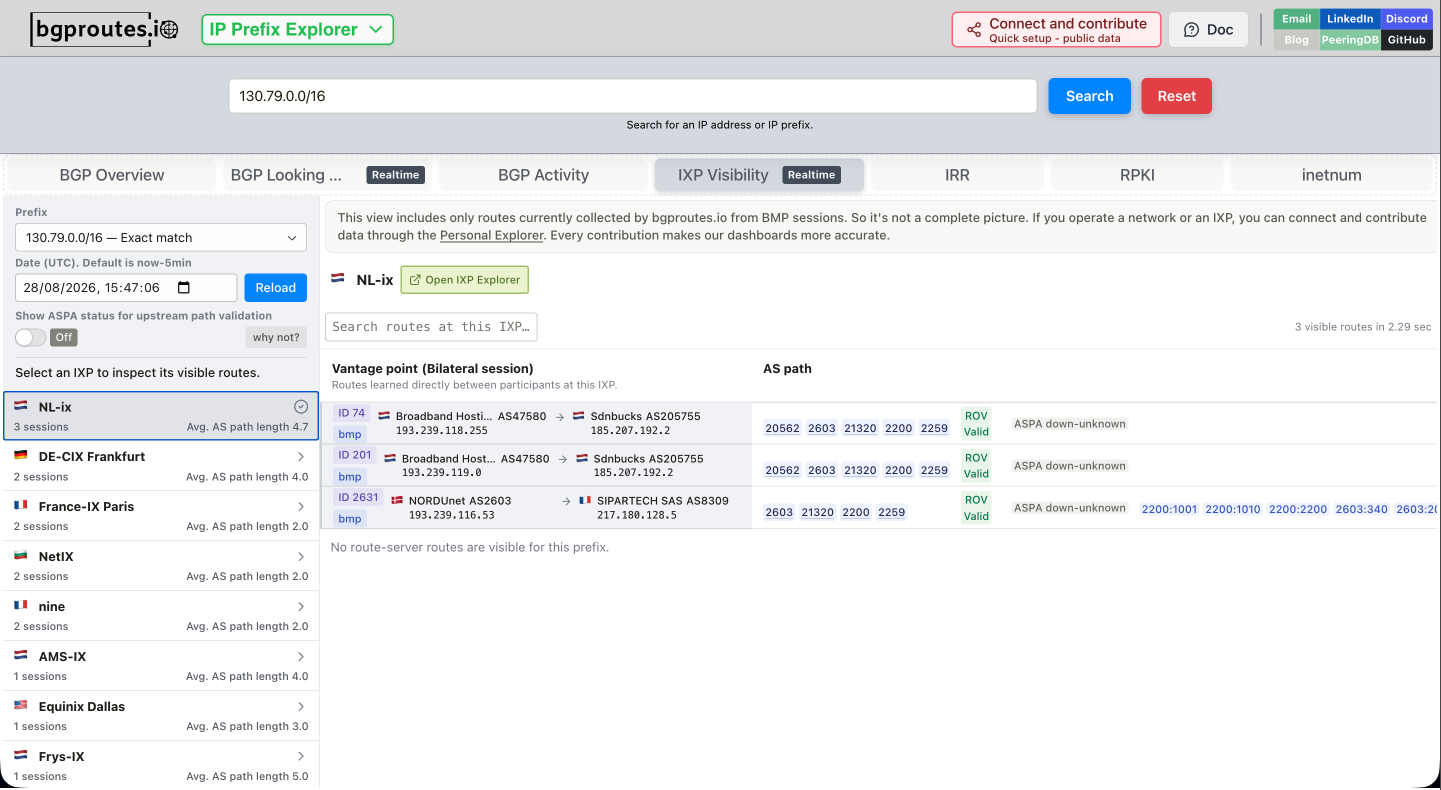
The IXP Visibility tab lists every IXP for which bgproutes.io currently has BMP-derived data for the selected prefix. Selecting an IXP displays the route-server and bilateral observations available there, including the sending and receiving ASes, AS path, communities, and ROV and ASPA validation status.
For any observation, the user can click its entry in the Vantage point column to open the corresponding Vantage Point Explorer. This makes it possible to inspect the underlying raw routing data for that session, including its update stream and routing state.
This cross-IXP view is useful when evaluating where to connect or where to establish a new bilateral session. For example, the list summarizes the average observed AS-path length at each IXP, while the route details reveal the shortest path currently visible across all covered exchanges. It can also show that different IXPs expose different paths to the same destination, which is valuable when investigating reachability or traffic-engineering behavior.
Finding where an AS is connected and contributes data
The AS Explorer provides an AS-centric view. For a selected network, its IXPs tab lists the exchanges where the AS is connected, together with information such as its IPv4 and IPv6 addresses, port speed, and route-server participation.
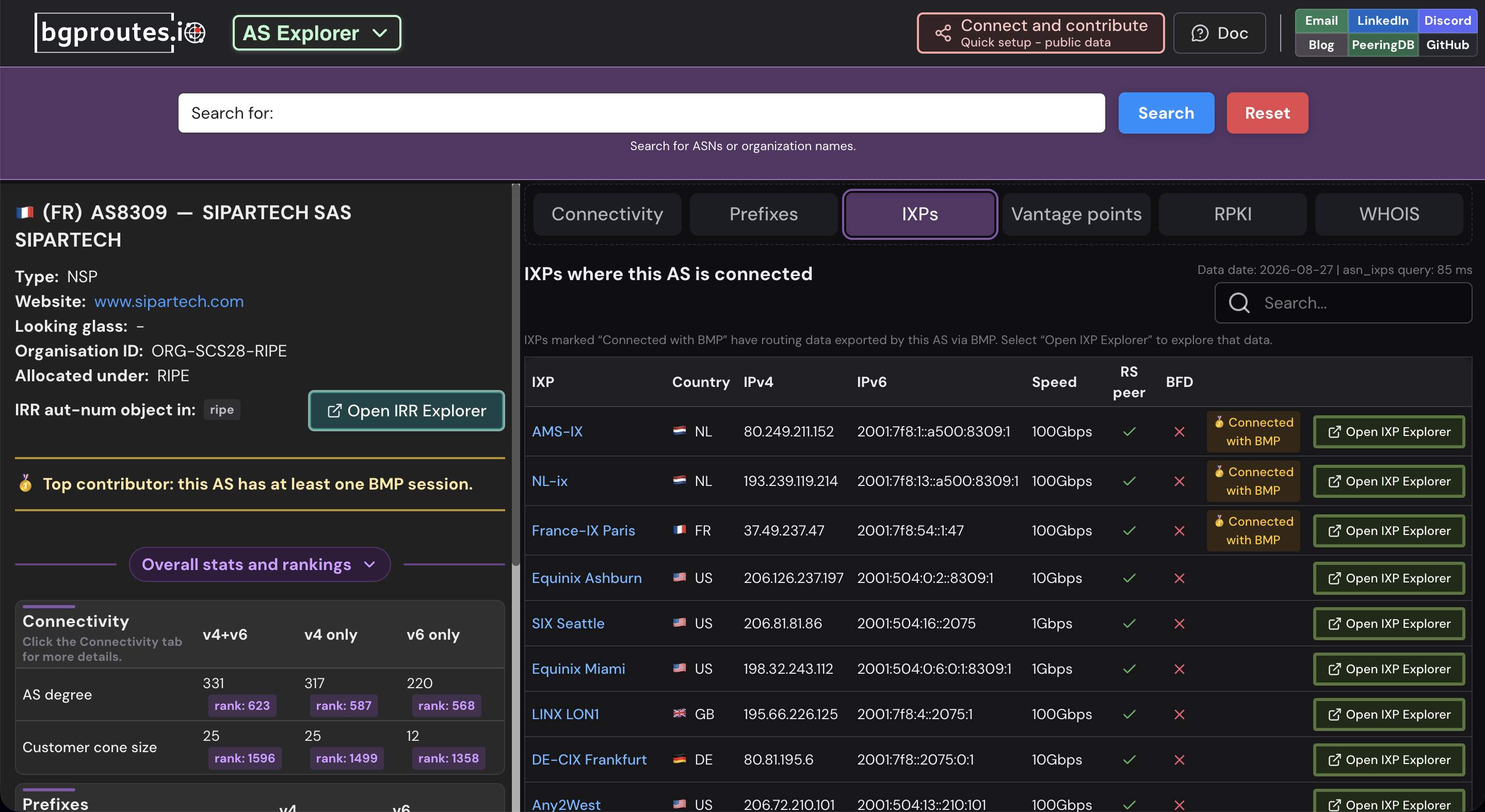
IXPs for which the AS exports routing data are marked 🥇 Connected with BMP. From there, the user can open the corresponding IXP Explorer and inspect the route-server and bilateral sessions contributed by that network.
This distinction is important: the dashboard shows both where the AS is present and where bgproutes.io has direct BMP visibility from that AS. In Figure 8, for example, SIPARTECH is connected to multiple IXPs, while the BMP badges identify the locations from which its routers actively contribute routing data.
Querying IXP data with the API
The dashboards are designed for interactive exploration, but the same data is also available through the bgproutes.io API. The API exposes endpoints for vantage points, RIB snapshots, and routing updates, and the pybgproutesapi Python client makes these endpoints straightforward to query from a script.
Imagine that a network operator wants to retrieve every prefix observed at EuroRhine-IX from route-server and bilateral sessions on July 27, 2026. EuroRhine-IX has PeeringDB IXP ID 4968. The workflow is simple: first retrieve the BMP vantage points associated with that IXP, then query the RIB of each vantage point and build the union of their prefixes.
from pybgproutesapi import vantage_points, rib

# Retrieve BMP vantage points associated with EuroRhine-IX:
# route-server sessions and bilateral sessions.
vps = vantage_points(ixp_ids=[4968])

query_date = "2026-07-27T00:00:00"
all_prefixes = set()

# Retrieve the RIB of each vantage point and merge its prefixes.
for vp in vps:
    ribs = rib([vp], date=query_date)
    routes = ribs[vp.peering_protocol][str(vp.id)]
    all_prefixes.update(routes.keys())

print(f"{len(all_prefixes)} unique prefixes observed at EuroRhine-IX")
Refining the vantage-point query
The vantage_points endpoint provides additional IXP-specific parameters that can be used to investigate a more precise subset of the data:
ixp_idsaccepts a list of IXP IDs and returns only vantage points associated with one of those IXPs.ixp_namesprovides the same type of filtering using IXP names instead of IDs.ixp_is_rsidentifies whether the vantage point's IP address is an IXP route-server address. Setting it toTruereturns only vantage points whose IP is identified as a route-server IP; setting it toFalseexcludes them.bmp_parent_ixp_is_rsapplies specifically to BMP vantage points and identifies whether the parent BMP exporter belongs to an IXP route-server ASN. It can therefore distinguish data exported by route servers from data exported by participant routers.
For example, ixp_is_rs=True is useful when an analysis should include only vantage points whose IP is associated with an IXP route server. For BMP-derived observations, bmp_parent_ixp_is_rs=True narrows the query to vantage points exported through a route-server BMP session. These can be combined with the endpoint's other parameters to refine an investigation by protocol, address family, collector, prefix coverage, and other vantage-point metadata.
The example is intentionally compact, but the same method can retrieve complete route attributes or updates instead of only prefix keys. The API also supports filters for prefixes, vantage points, ROV status, and ASPA status, making it possible to ask more targeted questions—for example, which downstream-invalid ASPA paths were observed at a particular IXP during an incident.
For more details about how bgproutes.io implements ASPA validation and how to retrieve and filter validation results with the API, see our blog post on ROV and ASPA validation.
When running the example, select a date that is available within the API's current retention window. The important part is the IXP-centric query: ixp_ids=[4968] discovers the relevant BMP vantage points, preserving the distinction between route-server and bilateral observations before their RIBs are analyzed.